Get started
Installation and Command Line Interface
Base installation
The package can be installed using pip:
pip install wmpy
wmpy comes installed with:
a default enumerator (based on the z3 SMT solver)
a default integration backend (approximate, based on rejection-sampling).
Additional requirements
To use the most up-to-date algorithms, you need to install additional requirements.
The command wmpy install can be used to install the requirements on Unix-like systems (Linux,
macOS). For Windows users, we recommend using the Windows Subsystem for Linux (WSL).
usage: wmpy install [-h] [--msat] [--latte] [--all] [--install-path INSTALL_PATH] [--assume-yes] [--force-reinstall] [--include-path INCLUDE_PATH] [--lib-path LIB_PATH] [--cxx CXX]

options:
  -h, --help            show this help message and exit
  --msat                Install MathSAT (default: False)
  --latte               Install LattE Integrale (default: False)
  --all                 Install all dependencies (default: False)
  --install-path INSTALL_PATH
                        Install path for external tools (default: $HOME/.wmpy)
  --assume-yes, -y      Automatic yes to prompts (default: False)
  --force-reinstall, -f
                        Force reinstallation of dependencies (default: False)
  --include-path INCLUDE_PATH
                        Additional include paths for compilation (can be specified multiple times) (default: ['/usr/local/include'])
  --lib-path LIB_PATH   Additional library paths for compilation (can be specified multiple times) (default: ['/usr/local/lib'])
  --cxx CXX             C++ compiler to use (default: g++)
E.g., for using the state-of-the-art Structure-Aware Enumerator (SAEnumerator), install
the MathSAT5 SMT solver API.
For an exact integration backend, install the LattE integrale library.
To install these requirements, you can run:
wmpy install --msat --latte --assume-yes
Follow the instructions to install the required dependencies, and
to update your PATH environment variable if necessary, e.g., by setting it in your shell configuration file as
follows:
PATH=$HOME/.wmpy/latte/bin:$PATH
Command line interface
The library comes with a command line interface to solve weighted model integration problems.
usage: wmpy run [-h] [--enumerator ENUMERATOR] [--async_queue_size ASYNC_QUEUE_SIZE] [--integrator INTEGRATOR] [--n_processes N_PROCESSES] [--n_samples N_SAMPLES] [--seed SEED] filename

positional arguments:
  filename              Path to the input density file

options:
  -h, --help            show this help message and exit
  --enumerator ENUMERATOR
                        Enumerator (msat, z3, or wrapper: async-..., possibly composed) (default: z3)
  --async_queue_size ASYNC_QUEUE_SIZE
                        Size of the async queue (for async enumerators) (default: None)
  --integrator INTEGRATOR
                        Integrator (latte, rejection, or wrapper: axisaligned-..., cache-..., parallel-..., possibly composed) (default: rejection)
  --n_processes N_PROCESSES
                        Number of processes (for parallel integrators) (default: None)
  --n_samples N_SAMPLES
                        Number of samples (for MC-based integrators) (default: None)
  --seed SEED           seed (for randomized integrators) (default: None)
WMI-PA
The code for the old wmipa package can be installed via:
pip install git+https://github.com/unitn-sml/wmpy.git@wmipa
A short tour
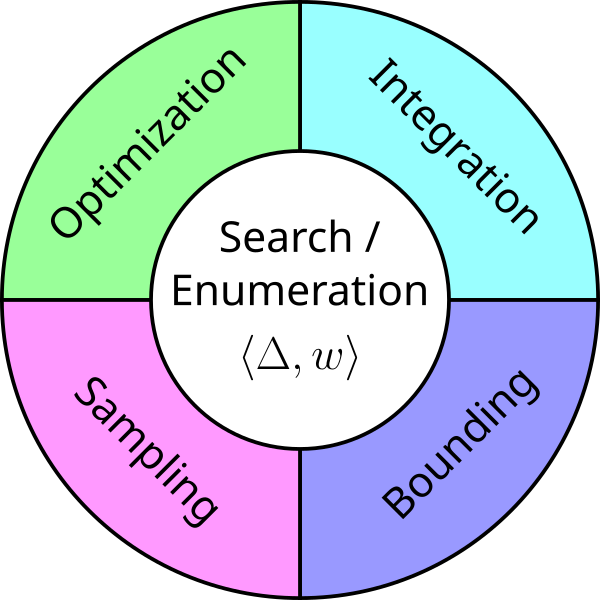
wmpy evolved from wmipa, a state-of-the-art SMT-based WMI
solver, with the goal of further extending its modular approach and
potentially accomodate other computational tasks over weighted SMT formulas.
Notice that the WMI task gracefully decomposes into two subtasks:
Enumerating the satisfying TAs \(\mu\) given a weighted SMT formula \(\langle \Delta, w \rangle\)
Integrating the resulting convex polytopes / integrands
The initial phases of development were driven by questions like:
What if one is only interested in the enumeration subtask?
What if the convex subtask is not continuous integration?
As a result, the core design principle of wmpy is modularity:
we designed different classes in order to be used as stand-alone
objects as well as sub-components of a larger solver.
Enumerators
The library offer different enumerators in the submodule
wmpy.enumeration. An enumerator constructor takes as input a
weighted SMT formula (plus the current pysmt environment).
from pysmt.shortcuts import *
from wmpy.enumeration import TotalEnumerator

...

smt_env = get_env()
enumerator = TotalEnumerator(support, w, smt_env)
Enumerators provide an enumerate method that takes as input a
query SMT-formula (encoding a subset of the support of interest)
and returns an Iterable over pairs of:
Satisfying TAs (implemented as dict mapping
pysmtatoms intobool)The number of unassigned Boolean variables (
int).
...

query = LE(x, Real(5))
for ta, nb in enumerator.enumerate(query):
     print("TA:", ta, "\nUnassigned booleans:", nb, "\n")
Warning
The number of unassigned Booleans is fundamental for computing the
count/integral. It will always be 0 (and therefore it can be ignored) for
enumerators returning total TAs, such as TotalEnumerator.
Enumerators can be used as stand-alone components. For instance, the
code below uses wmpy for implementing a procedure that turns
arbitrary SMT-LRA formulas in disjunctive normal form (DNF),
i.e. disjunctions of conjunctions of literals (atoms or their
negation).
from pysmt.shortcuts import *
from wmpy.enumeration import SAEnumerator

def to_dnf(formula, smt_env):
    partial_enumerator = SAEnumerator(formula, Real(1), smt_env)
    disjuncts = []
    for ta, _ in partial_enumerator.enumerate(Bool(True)):
        conj = And(*[atom if is_true else Not(atom) for atom, is_true in ta.items()])
        disjuncts.append(conj)

    return Or(*disjuncts)
Polytopes and Polynomials
For some applications, the output of an enumerator is already in the ideal format.
For all other use cases, wmpy leverages intermediate internal
representations for convex polytopes and polynomials. The classes
Polytope and Polynomial are meant to implement all the useful
function for manipulating these algebraic objects.
AssignmentConverter implements a wrapper around enumerators that
converts TAs into pairs (Polytope, Polynomial):
from wmpy.core import AssignmentConverter

...

# the continuous domain
domain = [Symbol("x", REAL), Symbol("y", REAL)]

converter = AssignmentConverter(self.enumerator)
for ta, nb in enumerator.enumerate(query):
     polytope, polynomial = converter.convert(truth_assignment, domain)
Polytope and Polynomial are meant to be stand-alone objects
and can be instantiated directly. Both are defined on a continuous
domain plus a set of inequalities (for the former) of a polynomial
expression (for the latter). Passing a pysmt environment to the
constructor is optional but recommended.
The following code example shows how tos convert them into a numpy
representation, or convert them back to (canonical) pysmt formulas
/ terms.
import numpy as np
from pysmt.shortcuts import *

from wmpy.core import Polytope, Polynomial

#### CONSTRUCTION

x = Symbol("x", REAL)
y = Symbol("y", REAL)

env = get_env()

# the continuous domain
domain = [x, y]

# a collection of inequalities
inequalities = [LE(Real(0), x), LE(Real(0), y), LE(Plus(x, y), Real(1))]
polytope = Polytope(inequalities, domain, env=get_env())

# a pysmt term equivalent to the (canonical) polynomial
# 2x^2 + 3xy + 4
expression = Times(
    Real(2),
    Plus(
        Pow(x, Real(2)),
        Times(Real(3 / 2), x, y),
        Real(2),
    ),
)
polynomial = Polynomial(expression, domain, env=get_env())


#### NUMPY CONVERSIONS

# a poltope can be converted into the numpy arrays:
A, b, s = polytope.to_numpy()

# where A x s < b s
# and   A x (1-s) <= b (1-s)

print(A.astype(float))
# >>> [[-1.  0.]
#      [ 0. -1.]
#      [ 1.  1.]]

print(b.astype(float))
# >>> [0. 0. 1.]

# a polynomial can be converted into a function taking numpy arrays as input
func = polynomial.to_numpy()

input_vec = np.array([[2, 3], [1 / 2, 0]])  # shape[1] has to be equal to len(domain)!
print(func(input_vec))
# >>> [30.0 4.5]

#### PYSMT CONVERSIONS

# this formula is equivalent to And(*inequalities)
formula = polytope.to_pysmt()

# this term is equivalent to expression (but in canonical form)
expression2 = polynomial.to_pysmt()
Integration
The submodule wmpy.integration contains a number of integrators,
which can be divided into base integrators and wrappers.
Base integrators implement an integrate method that takes as input
a pair (Polytope, Polynomial), respectively encoding the
integration bounds and the integrand. Additionally, an
integrate_batch method is also provided, solving collections of
integral at once.
from pysmt.shortcuts import *

from wmpy.core import Polynomial, Polytope
from wmpy.integration import RejectionIntegrator

smt_env = get_env()
x = Symbol("x", REAL)
domain = [x]

polytope = Polytope([LE(Real(-1), x), LE(x, Real(1))], domain, smt_env)  # x in [-1, 1]

const = Polynomial(Real(2), domain, smt_env)  # constant integrand: 2
linear = Polynomial(Plus(x, Real(1)), domain, smt_env)  # linear integrand: x + 1

approx_integrator = RejectionIntegrator(n_samples=100)
print(approx_integrator.integrate(polytope, const))
# >>> 4.0
print(approx_integrator.integrate(polytope, linear))
# >>> something close to 2.0

print(approx_integrator.integrate_batch([(polytope, linear), (polytope, const)]))
# >>> [something close to 2.0, 4.0]
Wrappers are objects that add some functionality to integrators, which
are passed as argument to their constructor. Once instantiated, these
implement the same integrate and integrate_batch functionality
as baseline integrators.
Some useful wrappers include:
AxisAlignedWrappercomputes in linear time (in \(|\mathbf{x}|\)) the integral if the integration domain is an axis-aligned bounding box and the integrand is constant. Otherwise, the enclosed integrator is called.ParallelWrapperuses multiprocessing for parallelizingintegrate_batchcalls using the enclosed integration method.CacheWrapperimplements a caching mechanism, possibly retrieving pre-computed results.
Wrappers can be combined:
...

from pysmt.integration import *

integrator = CacheWrapper(ParallelWrapper(LattEIntegrator()))
augments an the exact integrator based on LattE Integrale with both caching and multiprocessing.
Solvers
Different modules can be combined into more advanced solvers.
These solvers can be found in wmpy.solvers. Currently, the only
available solver is a WMI meta-solver WMISolver, which can be
instantiated with any enumerator and integrator.
For instance, the following lines implement the state-of-the-art WMI solver SAE4WMI [3]:
from pysmt.shortcuts import *

from wmpy.solvers import WMISolver

from wmpy.enumeration import SAEnumerator
from wmpy.integration import CacheWrapper, LattEIntegrator, ParallelWrapper


def instantiate_sae4wmi(support, w, smt_env, n_processes):
    enumerator = SAEnumerator(support, w, smt_env)
    integrator = CacheWrapper(
        ParallelWrapper(LattEIntegrator(), n_processes=n_processes)
    )
    return WMISolver(enumerator, integrator)